
Integrations
Visual Studio Code Extension
Task has an official extension for Visual Studio Code. The code for this project can be found in our GitHub repository. To use this extension, you must have Task v3.45.3+ installed on your system.
This extension provides the following features (and more):
- View tasks in the sidebar.
- Run tasks from the sidebar and command palette.
- Go to definition from the sidebar and command palette.
- Run last task command.
- Multi-root workspace support.
- Initialize a Taskfile in the current workspace.
To get autocompletion and validation for your Taskfile, see the Schema section below.

Configuration namespace change
In v1.0.0 of the extension, the configuration namespace was changed from task to taskfile in order to fix an issue.
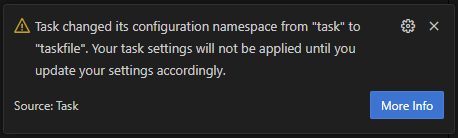
If you receive a warning like the one above, you will need to update your settings to use the new taskfile namespace instead:

Schema
This was initially created by @KROSF in this Gist and is now officially maintained in this file and made available at https://taskfile.dev/schema.json. This schema can be used to validate Taskfiles and provide autocompletion in many code editors:
Visual Studio Code
To integrate the schema into VS Code, you need to install the YAML extension by Red Hat. Any Taskfile.yml in your project should automatically be detected and validation/autocompletion should work. If this doesn't work or you want to manually configure it for files with a different name, you can add the following to your settings.json:
// settings.json
{
  "yaml.schemas": {
    "https://taskfile.dev/schema.json": [
      "**/Taskfile.yml",
      "./path/to/any/other/taskfile.yml"
    ]
  }
}
You can also configure the schema directly inside of a Taskfile by adding the following comment to the top of the file:
# yaml-language-server: $schema=https://taskfile.dev/schema.json
version: '3'
You can find more information on this in the YAML language server project.
AI/LLM Assistants
Task documentation is optimized for AI assistants like Claude Code, Cursor, and other LLM-powered development tools through the VitePress LLMs plugin.
This integration provides:
- Structured documentation in LLM-friendly formats
- Context-optimized content for AI assistants
- Automatic generation of
llms.txtandllms-full.txtfiles - Enhanced discoverability of Task features for AI tools
AI assistants can access Task documentation through:
- llms.txt: Lightweight overview of Task documentation
- llms-full.txt: Complete documentation with all content
These files are automatically generated and kept in sync with the documentation, ensuring AI assistants always have access to the latest Task features and usage patterns.
pre-commit
Task has official support for pre-commit, a framework for managing and maintaining multi-language pre-commit hooks. This allows you to automatically run Task tasks as part of your Git workflow.
Setup
Add the following to your .pre-commit-config.yaml:
repos:
  - repo: https://github.com/go-task/task
    rev: v3.x.x # Replace with the desired Task version
    hooks:
      - id: task
        args: ['my-task']
The hook will install Task via go install and run the specified task. You can use any task CLI arguments in the args field.
Configuration
The task hook supports the following pre-commit options:
| Option | Default | Description |
|---|---|---|
args | [] | Arguments passed to task (e.g. task name, --dir, flags) |
files | '' | Only run the hook when these files change |
Examples
Run a task unconditionally on every commit
repos:
  - repo: https://github.com/go-task/task
    rev: v3.x.x
    hooks:
      - id: task
        args: ['lint']
Run a task only when certain files change
repos:
  - repo: https://github.com/go-task/task
    rev: v3.x.x
    hooks:
      - id: task
        files: ^docs/
        args: ['generate-docs']
Run a task in a subdirectory
repos:
  - repo: https://github.com/go-task/task
    rev: v3.x.x
    hooks:
      - id: task
        args: ['--dir', 'frontend', 'build']
Run multiple tasks with different file triggers
repos:
  - repo: https://github.com/go-task/task
    rev: v3.x.x
    hooks:
      - id: task
        name: lint
        files: \.go$
        args: ['lint']
      - id: task
        name: generate
        files: \.proto$
        args: ['generate']
Run a lightweight task on commit and a heavier task on push
repos:
  - repo: https://github.com/go-task/task
    rev: v3.x.x
    hooks:
      - id: task
        name: lint
        args: ['lint']
        stages: [pre-commit]
      - id: task
        name: test
        args: ['test']
        stages: [pre-push]
Community Integrations
In addition to our official integrations, there is an amazing community of developers who have created their own integrations for Task:
- Sublime Text Plugin [source] by @biozz
- IntelliJ Plugin [source] by @lechuckroh
- mk command line tool recognizes Taskfiles natively.
- fzf-make fuzzy finder with preview window for make, pnpm, yarn, just & task.
If you have made something that integrates with Task, please feel free to open a PR to add it to this list.